 Activity for ClickUp
The ClickUp Inbox takes too many clicks. Is there a faster way?
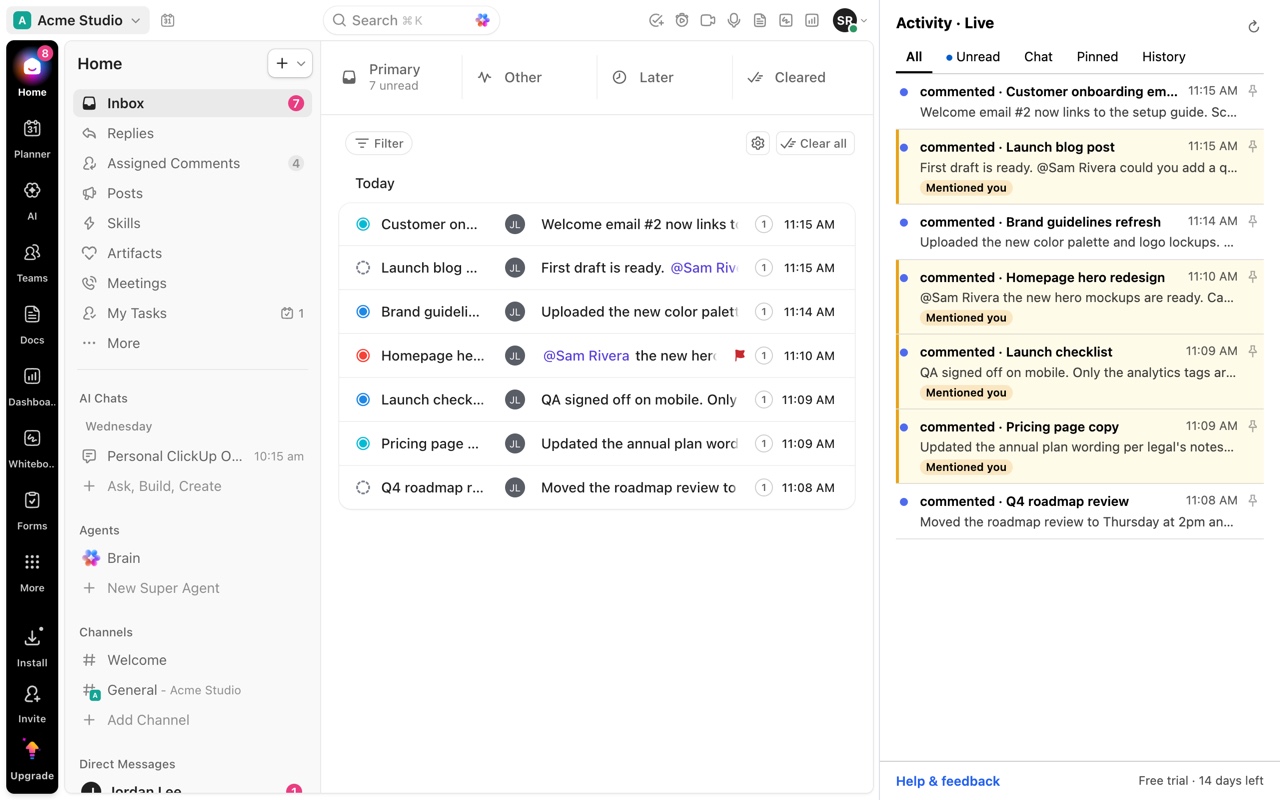
Since ClickUp's Inbox 3.0, clicking a notification opens an intermediate view of comments and activity rather than the task, and notifications are split across Important and Other. Getting from a notification to the work takes several clicks. Activity for ClickUp lists Inbox and Chat in Chrome's side panel and goes from a notification to the exact comment in one click, with keyboard navigation.
Updated by ClrBlu
What ClickUp users report
Inbox 3.0 drew a long thread of feedback asking ClickUp to revert or simplify it. The recurring complaints are concrete: a notification opens an intermediary view instead of the task; there are two lists to check every time instead of one; and opening the task from an expanded notification costs another click with no keyboard shortcut.
Each extra click is small. Across fifty or a hundred notifications a day, it is the difference between triaging in five minutes and losing twenty.
Public requests on ClickUp's feedback board:
- Inbox: please consider reverting Inbox changes made in 3.0
- Get rid of the new intermediary view for notifications in CU 3.0
- Too many clicks in ClickUp 3.0: task view and Inbox
- Simplify the Inbox: too many clicks and confusing
- Inbox: open task on notification click
What you can do in ClickUp today
- In the Inbox, J and K (or the arrow keys) move between notifications, and U toggles read and unread.
- Clearing an expanded notification group moves you to the next one.
- Turning off notification types you never act on, in notification settings, shortens the list.
How Activity for ClickUp solves it
Activity for ClickUp keeps one feed of Inbox notifications and Chat in Chrome's side panel, with tabs for All, Unread, Chat, Pinned and History. One click opens the item in your ClickUp tab at the exact comment or change. There is no intermediate view, and the panel stays open, so the next notification is right there.
The panel is built for the keyboard throughout, so you can work through a busy morning without reaching for the mouse.
Questions
Does Activity replace the ClickUp Inbox?
No. It reads the Inbox ClickUp already shows you and presents it in a faster panel. ClickUp stays the source of truth.
Will it clear or mark my notifications as read?
No. ClickUp decides what is read. The panel reflects ClickUp's read state and never changes it.
Can I go back to Inbox 2.0?
ClickUp has not offered a way to revert. Activity gives you a single list and one-click opening without changing your ClickUp settings.