 Activity for ClickUp
Why doesn't a ClickUp notification open the exact comment?
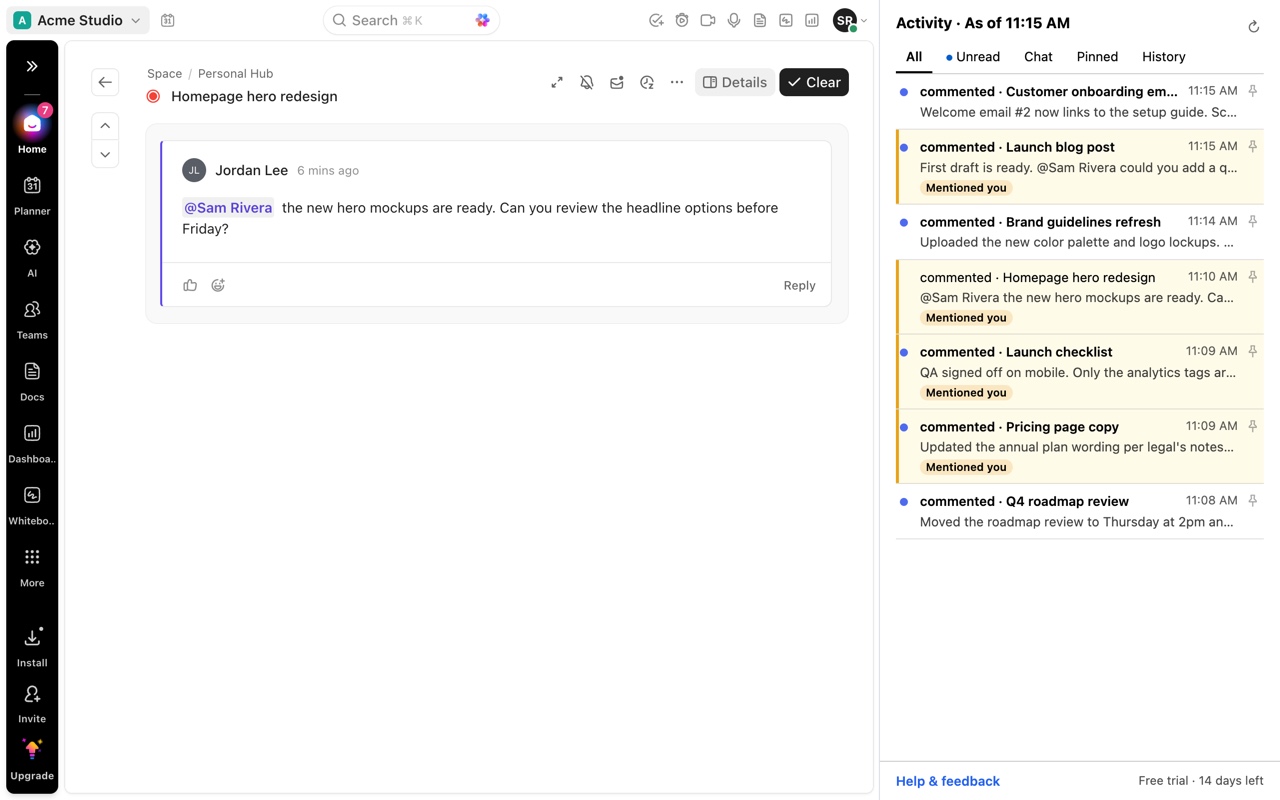
When you click a comment notification in the ClickUp Inbox, ClickUp opens the task or a comment preview, but it does not reliably scroll to and highlight the comment that triggered it. On long tasks you end up scrolling the activity feed to find it. Activity for ClickUp opens the item in your ClickUp tab and highlights the exact comment, reply or change.
Updated by ClrBlu
What ClickUp users report
This is one of the most requested Inbox changes on ClickUp's public feedback board. People describe the same loop: get notified about a comment, click it, land at the top of a task with dozens or hundreds of comments, and scroll back through a thread they have already read to find the one new reply.
It is worst on long-running tasks, tasks with attachments that collect their own comments, and threads with many replies, because the comment you were notified about can be far from where the task opens. ClickUp's search does not cover comment text in every case, so searching for it is not a reliable fallback either.
Public requests on ClickUp's feedback board:
- ClickUp Inbox: clicking a comment should open the task and highlight the comment
- Open task directly from Inbox instead of showing the intermediate view of comments/activity
- Inbox comments
- Deep link to comments on an attachment
- Search comments
What you can do in ClickUp today
- Open the notification, then use the comment's own link (its menu has Copy link) to return to it later.
- Collapse threaded replies in the task's activity feed to shorten the scroll.
- Pin a comment you will need again so it stays at the top of the task's activity.
These help after you have found the comment once. None of them takes you from the notification to the comment in one click.
How Activity for ClickUp solves it
Activity for ClickUp is a Chrome extension that lists your ClickUp Inbox and Chat in Chrome's side panel. Click any item and Activity opens it in your ClickUp tab and highlights the specific comment, reply or field change behind it. You land on the comment, not the top of the task.
It works through the ClickUp tab you already have open, with your normal session. It needs no ClickUp login, API key or workspace admin approval.
Questions
Does ClickUp have a setting to open notifications at the comment?
Not as of October 31, 2026. The request is open on ClickUp's feedback board. Activity for ClickUp adds the behavior in Chrome.
Does it work for replies inside a thread?
Yes. Activity highlights the specific reply, not just the parent comment.
Does it work for Docs and Chat?
Activity lists Inbox notifications and Chat conversations, and opens each at the item behind it.