 Activity for ClickUp
How to stop missing @mentions in ClickUp
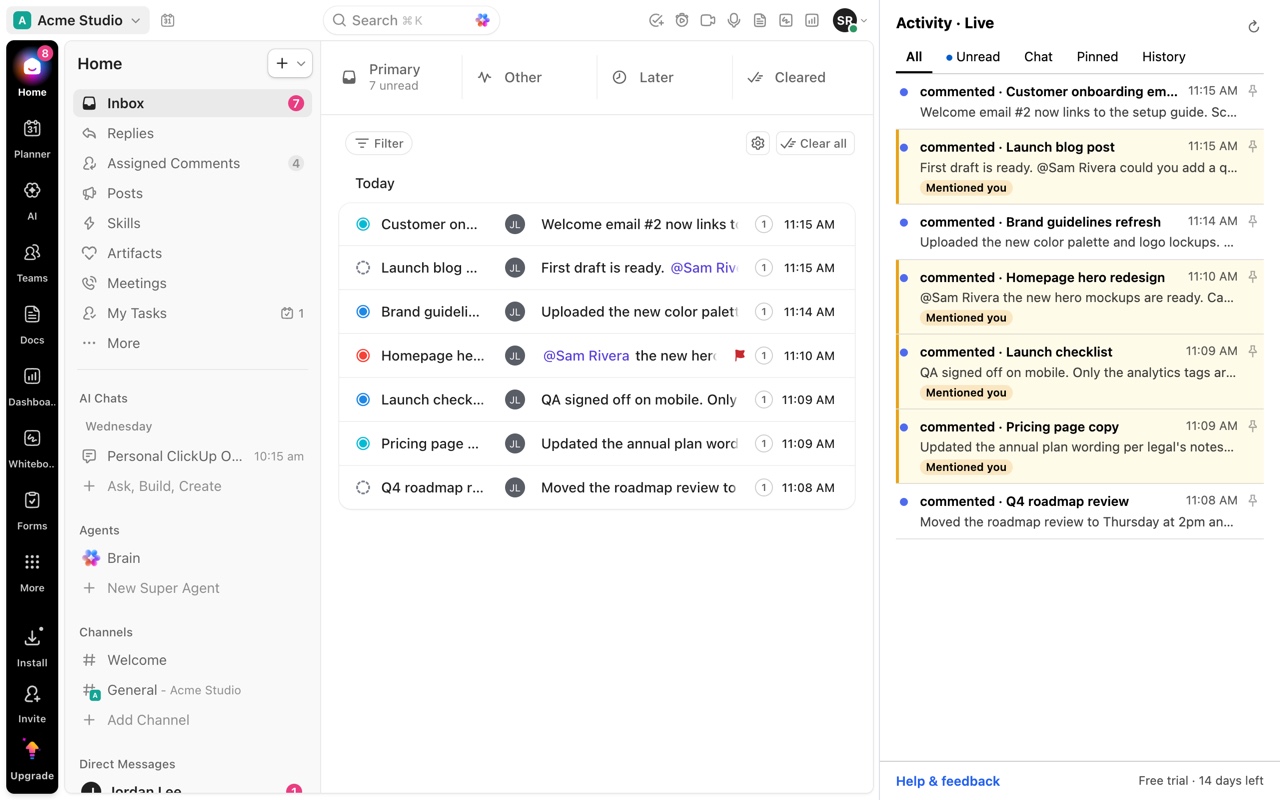
ClickUp @mentions get buried because they arrive in the same Inbox as watcher updates, status changes and automation notifications, and ClickUp has no single list of every mention across tasks, Docs and Chat. Activity for ClickUp highlights mentions in its side-panel feed, so they stand out from routine updates, and lets you pin the ones you need to come back to.
Updated by ClrBlu
What ClickUp users report
On ClickUp's feedback board, people describe @mentions buried in both email and ClickUp notifications, asks for a way to find all of their mentions and assigned comments in one place, and requests to filter by @mention. A related thread notes that notifications about added watchers push more important ones, like a mention that came just before, out of view.
Public requests on ClickUp's feedback board:
- Inbox should include @mentions
- Finding all mentions of @s and assignments
- Add filtering by @mentions
- Add a dashboard card to review all mentions and assigned comments
- Ability to turn off notifications about added watchers
What you can do in ClickUp today
- In notification settings, turn off update types you never act on, such as watcher changes, so mentions make up more of the Inbox.
- In Chat, the Chat activity view can filter to messages that mention you.
- Assigning a comment, rather than only mentioning someone, puts it in their assigned comments.
How Activity for ClickUp solves it
Activity for ClickUp highlights mentions in its feed, so a message that needs your answer stands out from the routine updates around it. Pin it and it stays in the Pinned tab until you come back to it. Click it and ClickUp opens at that comment, highlighted.
Activity does not change what ClickUp sends you. Pair it with trimmed notification settings for the quietest feed.
Questions
Does Activity show mentions from Chat as well as tasks?
Yes. Inbox notifications and Chat conversations are in the same feed, with mentions highlighted.
Can it notify me about mentions ClickUp doesn't?
No. Activity shows what ClickUp's Inbox and Chat already contain. It does not create new notifications.
Is my ClickUp data sent anywhere?
No. Your ClickUp data stays in your browser. The only other connection is a once-a-day license check that sends the license key, never ClickUp data.