 Activity for ClickUp
ClickUp notification says something changed. How do I find what changed?
You see the notification. You click it. The task opens. Now comes the part that wastes time: what actually changed?
Updated by ClrBlu
On a busy ClickUp task, the notification can send you into a long activity stream containing comments, replies, status changes, assignments and older conversations. If the new activity is inside a thread, finding it can mean rereading a conversation you already read once.
That is not just a theoretical edge case. ClickUp users publicly describe the same workflow: the notification gets their attention, but locating the specific update takes far longer than it should.
Why this gets frustrating so quickly
A single hunt through a task is minor. Repeating it all day is not. The friction usually looks like this:
- Notice a new Inbox item.
- Open it.
- Land in the task or conversation view.
- Scan the activity.
- Expand or inspect threads.
- Work out which reply is new.
- Reconstruct enough context to understand why you were notified.
In one r/clickup discussion, a user said threaded-comment notifications can take 20+ seconds to decipher and that they sometimes leave without finding the latest comment.
That is the problem Activity for ClickUp is designed around.
What ClickUp users report
The same themes appear repeatedly in public discussions:
- clicking a notification does not always make the triggering message obvious;
- threaded comments make it difficult to tell which reply is new;
- Inbox rows often do not contain enough context to decide what needs attention;
- users end up reopening and rereading work they have already seen.
The issue was still being discussed in r/clickup in September 2026, when a user asked about Inbox notifications not taking them to the message that triggered the notification.
Public discussions on r/clickup:
- Clickup UI: threaded notifications
- Channels with new messages not bolded?
- Sorry Inbox.... I am reverting back
What you can do in ClickUp
A few habits reduce the amount of searching:
- Trim notification types you rarely act on so the Inbox contains less noise.
- Use ClickUp's Inbox keyboard navigation when working through many items.
- Pin or copy a comment link after you have found something you will need again.
- Collapse older threaded replies when a task's activity has become long.
Those are useful workflow improvements, but they do not remove the first hunt: you still have to identify the update before you can act on it.
How Activity for ClickUp changes the workflow
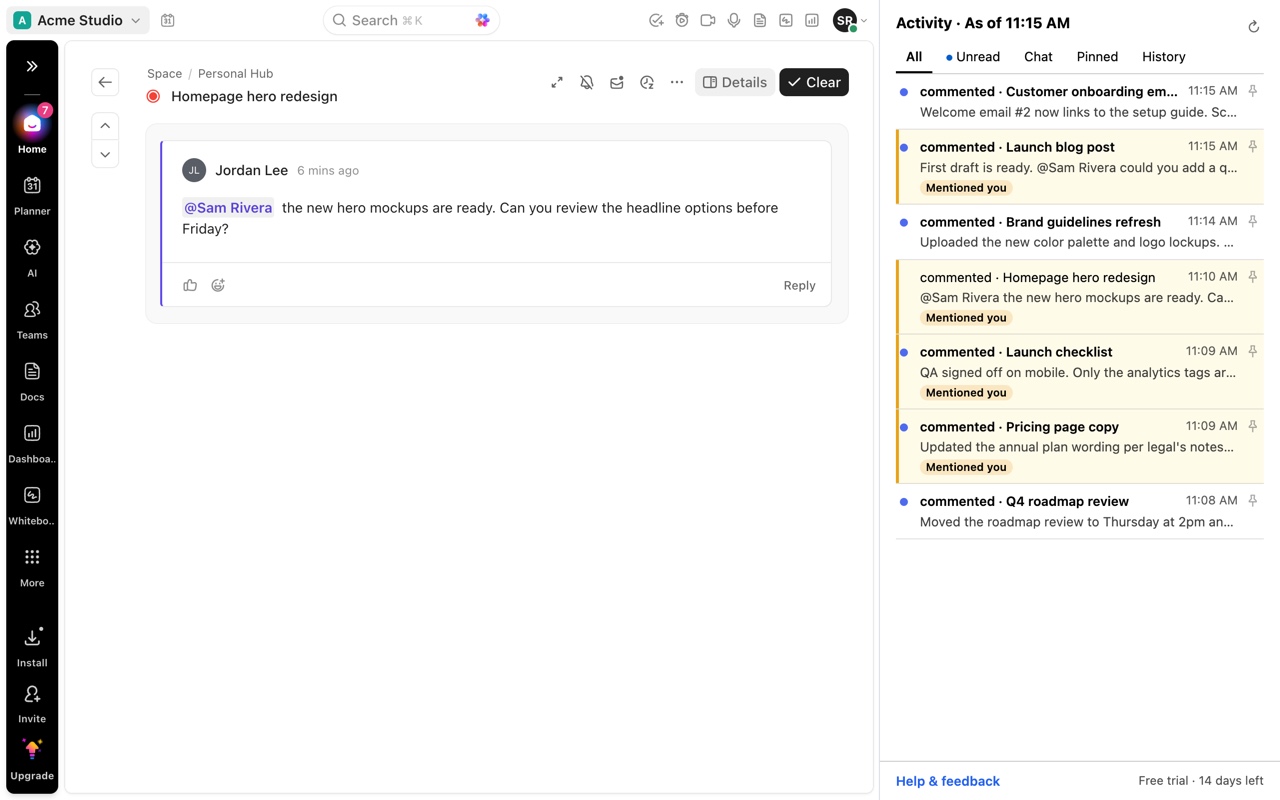
Activity for ClickUp puts your ClickUp Inbox and Chat in Chrome's side panel.
Choose an item and Activity opens it in your existing ClickUp tab at the specific comment, reply or supported change behind the notification and highlights it.
Instead of notification → task → scan → search → reread → find the change, you get notification → exact change.
The panel remains open beside your work, so the next notification is still there when you finish.
What Activity does not do
Activity does not create or replace ClickUp notifications.
If ClickUp never puts an event into the Inbox or Chat that Activity reads, Activity cannot invent the missing notification. ClickUp remains the source of truth.
Activity is for the next problem: once ClickUp tells you something happened, get to the thing that happened faster.
Questions
Why doesn't ClickUp just open every notification at the exact comment?
Different ClickUp notification types and task views behave differently. Public ClickUp feedback requests have asked for more precise deep-linking and highlighting. Activity adds a browser-side workflow for the notifications it can identify.
Does Activity work with replies inside comment threads?
Yes. When Activity can identify the reply behind the Inbox item, it opens the task at that reply and highlights it.
Does Activity replace my ClickUp Inbox?
No. ClickUp remains the source of truth. Activity reads the Inbox and Chat that ClickUp already displays through your logged-in browser session and presents them in Chrome's side panel.
Does ClrBlu receive my ClickUp data?
No. Your ClickUp data stays in your browser. Activity does not require your ClickUp password or API key and does not send ClickUp content to ClrBlu.